Hilfe:Neue Seite anlegen/en: Unterschied zwischen den Versionen
Uslex (Diskussion | Beiträge) Die Seite wurde neu angelegt: „== How do I create a new article in the TC wiki? == === Step 1: Think of a name ===“ |
Übernehme Bearbeitung einer neuen Version der Quellseite |
||
| (19 dazwischenliegende Versionen von 2 Benutzern werden nicht angezeigt) | |||
| Zeile 1: | Zeile 1: | ||
<languages/> | <languages/> | ||
{{ | {{TC7891011gsb}} | ||
__NOTOC__ | __NOTOC__ | ||
| Zeile 10: | Zeile 10: | ||
< | <span id="Schritt_2:_Artikel_einordnen"></span> | ||
=== | === Step 2: Classify articles === | ||
Next, I consider which '''category''' this new article should be placed in. In this example, it would be the category: | |||
*'''Hardware''' | *'''Hardware''' | ||
I click on the selected category '''Hardware''' in the navigation and look for the place where the new article fits in. In this example, the chapter would be: | |||
*'''Locomotives''' in the Hardware section. | |||
*''' | |||
< | <span id="Schritt_3:_Rubrik_bearbeiten"></span> | ||
=== | === Step 3: Edit category === | ||
I'll edit the '''Hardware''' section and add the link to the new article there. | |||
This is what it looks like '''before the new entry''': | |||
<pre> | <pre> | ||
=== | ===Preparing locomotives for TC=== | ||
* [[Decoder_Bremsverzögerung]] | * [[Special:MyLanguage/Decoder_Bremsverzögerung|Decoder_Braking_Delay]] | ||
* [[Decoder Geschwindigkeitsprofil]] - | * [[Special:MyLanguage/Decoder Geschwindigkeitsprofil|Decoder Speed Profile]] - Setting minimum, average and maximum speed | ||
</pre> | </pre> | ||
And this is what it looks like '''after the new entry''' with the inserted '''Clean wheels''' (german: '''Räder säubern'''): | |||
<pre> | <pre> | ||
=== | ===Preparing locomotives for TC=== | ||
* [[Decoder_Bremsverzögerung]] | * [[Special:MyLanguage/Decoder_Bremsverzögerung|Decoder_Braking_Delay]] | ||
* [[Decoder Geschwindigkeitsprofil]] - | * [[Special:MyLanguage/Decoder Geschwindigkeitsprofil|Decoder Speed Profile]] - Setting minimum, average and maximum speed | ||
* [[Räder säubern]] | * [[Special:MyLanguage/Räder säubern|Cleaning wheels]] | ||
</pre> | </pre> | ||
# | # | ||
< | <span id="Schritt_4:_Abspeichern"></span> | ||
=== | === Step 4: Save === | ||
The link for the new article '''Cleaning wheels''' has been created, the change is saved. | |||
:[[Datei:RaederReinigen.png|400px]] | :[[Datei:RaederReinigen.png|400px]] | ||
:'' | :''Fig: Link is red'' | ||
'''Check:''' The new article should now appear <span style="color:#FF0000">red</span> because it does not yet exist. We have only created a link to it. | |||
''' | |||
< | <span id="Schritt_5:_Artikelinhalt_schreiben"></span> | ||
=== | === Step 5: Write article content === | ||
Now comes the '''actual creation''' of the new article. To do this, I click on <span style="color:#FF0000">red link</span> with the new article name '''Cleaning wheels'''. | |||
:[[Datei:NeuerArtikel.png|400px]] | :[[Datei:NeuerArtikel.png|400px]] | ||
:'' | :''Fig: New article'' | ||
The newly created article '''Cleaning wheels''' appears, click on: | |||
* "'''create'''" and you can start writing immediately. | |||
* "''' | |||
== New article == | |||
=== Basic framework for the new article === | |||
=== | |||
This basic structure can simply be copied and pasted into the new empty article. | |||
<pre> | <pre> | ||
{{TC78910gsb}} | {{TC78910gsb}} | ||
__NOTOC__ | __NOTOC__ | ||
== | == Main heading == | ||
=== | === Chapter heading === | ||
Contents | |||
== Weblinks == | == Weblinks == | ||
* | *Source: [Link] | ||
:-- ~~~~ | :-- ~~~~ | ||
[[Kategorie: ....]] | [[Kategorie: ....]] | ||
</pre> | </pre> | ||
< | <span id="Erläuterungen_für_das_Grundgerüst"></span> | ||
=== | === Explanations for the basic framework === | ||
The individual lines of the basic framework are explained here. | |||
<pre> | <pre> | ||
{{TC78910gsb}} | {{TC78910gsb}} for which TC version(s) valid? 7 8 9 10 and the color (g)old (s)ilver (b)ronze | ||
__NOTOC__ | __NOTOC__ do not create an extra table of contents | ||
== | == Main heading == replace here | ||
=== | === Chapter heading === also insert | ||
the content of the article here | |||
== Weblinks == | == Weblinks == | ||
* | *Source: [Link] Establish a connection to the topic in the forum | ||
:-- [[Benutzer:Uslex|Uslex]] ([[Benutzer Diskussion:Uslex|Diskussion]]) 13:12, 7. Jun. 2023 (CEST) | :-- [[Benutzer:Uslex|Uslex]] ([[Benutzer Diskussion:Uslex|Diskussion]]) 13:12, 7. Jun. 2023 (CEST) the waves are automatically replaced by the name of the author | ||
[[Kategorie: ....]] | [[Kategorie: ....]] possibly this line multiple times for multiple categories | ||
</pre> | </pre> | ||
That's it. Have fun creating new articles. | |||
== Weblinks == | |||
* TC-wiki: [[Beispielseite{{#translation:}}| Example page]] | |||
:--[[Benutzer:Uslex|Uslex]] ([[Benutzer Diskussion:Uslex|Diskussion]]) 09:22, 9. Apr. 2021 (CEST) | :--[[Benutzer:Uslex|Uslex]] ([[Benutzer Diskussion:Uslex|Diskussion]]) 09:22, 9. Apr. 2021 (CEST) | ||
Aktuelle Version vom 9. November 2025, 19:47 Uhr
| Verwendung |

|
How do I create a new article in the TC wiki?
Step 1: Think of a name
I think of a name for the new article. In this example we choose the name:
- Cleaning wheels
Step 2: Classify articles
Next, I consider which category this new article should be placed in. In this example, it would be the category:
- Hardware
I click on the selected category Hardware in the navigation and look for the place where the new article fits in. In this example, the chapter would be:
- Locomotives in the Hardware section.
Step 3: Edit category
I'll edit the Hardware section and add the link to the new article there.
This is what it looks like before the new entry:
===Preparing locomotives for TC=== * [[Special:MyLanguage/Decoder_Bremsverzögerung|Decoder_Braking_Delay]] * [[Special:MyLanguage/Decoder Geschwindigkeitsprofil|Decoder Speed Profile]] - Setting minimum, average and maximum speed
And this is what it looks like after the new entry with the inserted Clean wheels (german: Räder säubern):
===Preparing locomotives for TC=== * [[Special:MyLanguage/Decoder_Bremsverzögerung|Decoder_Braking_Delay]] * [[Special:MyLanguage/Decoder Geschwindigkeitsprofil|Decoder Speed Profile]] - Setting minimum, average and maximum speed * [[Special:MyLanguage/Räder säubern|Cleaning wheels]]
Step 4: Save
The link for the new article Cleaning wheels has been created, the change is saved.

- Fig: Link is red

Check: The new article should now appear red because it does not yet exist. We have only created a link to it.
Step 5: Write article content
Now comes the actual creation of the new article. To do this, I click on red link with the new article name Cleaning wheels.
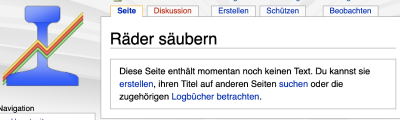
- Fig: New article

The newly created article Cleaning wheels appears, click on:
- "create" and you can start writing immediately.
New article
Basic framework for the new article
This basic structure can simply be copied and pasted into the new empty article.
{{TC78910gsb}}
__NOTOC__
== Main heading ==
=== Chapter heading ===
Contents
== Weblinks ==
*Source: [Link]
:-- ~~~~
[[Kategorie: ....]]
Explanations for the basic framework
The individual lines of the basic framework are explained here.
{{TC78910gsb}} for which TC version(s) valid? 7 8 9 10 and the color (g)old (s)ilver (b)ronze
__NOTOC__ do not create an extra table of contents
== Main heading == replace here
=== Chapter heading === also insert
the content of the article here
== Weblinks ==
*Source: [Link] Establish a connection to the topic in the forum
:-- [[Benutzer:Uslex|Uslex]] ([[Benutzer Diskussion:Uslex|Diskussion]]) 13:12, 7. Jun. 2023 (CEST) the waves are automatically replaced by the name of the author
[[Kategorie: ....]] possibly this line multiple times for multiple categories
That's it. Have fun creating new articles.
Weblinks
- TC-wiki: Example page
- --Uslex (Diskussion) 09:22, 9. Apr. 2021 (CEST)
- bearbeitet: Uslex (Diskussion) 08:53, 5. Feb. 2023 (CET), Uslex (Diskussion) 10:21, 31. Jan. 2025 (CET)