Ich möchte meine Anlagendatei zur Verfügung stellen/en: Unterschied zwischen den Versionen
Aus RailRoad&Co.-Wiki
Zur Navigation springenZur Suche springen
Uslex (Diskussion | Beiträge) Die Seite wurde neu angelegt: „=== Uploading file attachments in the forum ===“ |
Uslex (Diskussion | Beiträge) Die Seite wurde neu angelegt: „*Forum: [https://www.freiwaldsoftware.de/forum/?language=german www.freiwaldsoftware.de/forum] *TC-wiki: File Extensions *TC-wiki: Ask a question in the forum“ |
||
| (5 dazwischenliegende Versionen desselben Benutzers werden nicht angezeigt) | |||
| Zeile 33: | Zeile 33: | ||
=== Uploading file attachments in the forum === | === Uploading file attachments in the forum === | ||
* The file with the extension '''*.zip''' can then be uploaded. | |||
* | |||
Under "Upload file attachment" in the forum, only file extensions *.zip; *.pdf and image files can be uploaded. | |||
< | <span id="Welche_Datei_gehört_zu_welchem_TC_Programm?"></span> | ||
=== | === Which file belongs to which TC program? === | ||
The TC wiki, under [[Special:MyLanguage/Dateiendungen_von_TC| File extensions]], describes which file extension belongs to which TC program. Once the correct file is found, you can proceed to the step "'''Create ZIP file'''". | |||
== Weblinks == | == Weblinks == | ||
*Forum: [https://www.freiwaldsoftware.de/forum/?language=german www.freiwaldsoftware.de/forum] | *Forum: [https://www.freiwaldsoftware.de/forum/?language=german www.freiwaldsoftware.de/forum] | ||
*TC-wiki: [[Special:MyLanguage/Dateiendungen von TC| | *TC-wiki: [[Special:MyLanguage/Dateiendungen von TC|File Extensions]] | ||
*TC-wiki: [[Special:MyLanguage/Frage im Forum stellen| | *TC-wiki: [[Special:MyLanguage/Frage im Forum stellen|Ask a question in the forum]] | ||
Aktuelle Version vom 17. November 2025, 14:10 Uhr
| Verwendung |

|
Provide attachment file
Exit TrainController first
Before the asset file can be made available, TrainController must be closed. An open file cannot be compressed.
Also:
- Exit TrainController and
- wait a few seconds to ensure everything is properly saved and closed.
Create ZIP file
The following procedure is necessary to provide an attachment file/project file or an image:
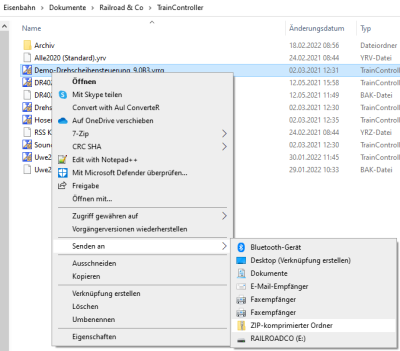
- Image: ZIP-compressed folder

- Open Windows Explorer
- Open the folder "My Documents" and then "Documents" -> "Railroad&Co" -> "TrainController"
- Select the correct file (click once - do not double-click - release the mouse button)
- Right-click and select "Send to"
- Select "Compressed (zipped) folder"
Uploading file attachments in the forum
- The file with the extension *.zip can then be uploaded.
Under "Upload file attachment" in the forum, only file extensions *.zip; *.pdf and image files can be uploaded.
Which file belongs to which TC program?
The TC wiki, under File extensions, describes which file extension belongs to which TC program. Once the correct file is found, you can proceed to the step "Create ZIP file".
Weblinks
- Forum: www.freiwaldsoftware.de/forum
- TC-wiki: File Extensions
- TC-wiki: Ask a question in the forum
- -- Wohlmannstetter (Diskussion) 10:22, 30. Jan. 2010 (CET)
- bearbeitet: Digi thomas2003 14:46, 1. Feb. 2014, Uslex (Diskussion) 13:31, 19. Jul. 2022 (CEST), Uslex (Diskussion) 14:37, 19. Jul. 2023 (UTC)