Bahnhofsuhr anhalten/en: Unterschied zwischen den Versionen
Aus RailRoad&Co.-Wiki
Zur Navigation springenZur Suche springen
Uslex (Diskussion | Beiträge) Die Seite wurde neu angelegt: „*if it is '''highlighted in color''', then it is running. *if it is '''NOT highlighted in color''', then it is stopped...“ |
Uslex (Diskussion | Beiträge) Die Seite wurde neu angelegt: „== Weblinks ==“ |
||
| Zeile 25: | Zeile 25: | ||
*if it is '''NOT highlighted in color''', then it is stopped... | *if it is '''NOT highlighted in color''', then it is stopped... | ||
Both conditions will not change on their own until you do something. | |||
== Weblinks == | == Weblinks == | ||
<div lang="de" dir="ltr" class="mw-content-ltr"> | <div lang="de" dir="ltr" class="mw-content-ltr"> | ||
Version vom 15. Januar 2025, 17:09 Uhr
| Verwendung |

|
Station clock
Station clock in edit mode
I want to turn off the station clock completely.
If the edit mode is switched on, the clock will stop until I switch the edit mode off again.
Stop station clock
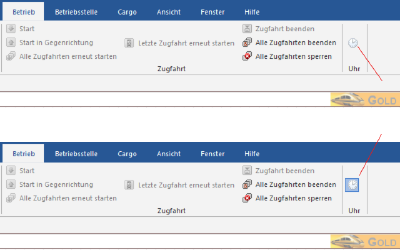
- Fig: Model railway clock top=off/bottom=on

To do this, click on the station clock symbol in the menu in operating mode:
- if it is highlighted in color, then it is running.
- if it is NOT highlighted in color, then it is stopped...
Both conditions will not change on their own until you do something.
Weblinks
- Quelle: Forum
- TC-wiki: Uhr im Fahrplanmodus
- TC-wiki: Zeitangaben in TC
- -- Florian Strobl 07:39, 25. Mär. 2024 (UTC)
- bearbeitet: Uslex (Diskussion) 07:39, 25. Mär. 2024 (UTC)