Hilfe:Seite übersetzen/en: Unterschied zwischen den Versionen
Uslex (Diskussion | Beiträge) Die Seite wurde neu angelegt: „The translation is only correct as follows:“ |
Übernehme Bearbeitung einer neuen Version der Quellseite |
||
| (11 dazwischenliegende Versionen von 2 Benutzern werden nicht angezeigt) | |||
| Zeile 9: | Zeile 9: | ||
== Translate TC-wiki article == | == Translate TC-wiki article == | ||
{{ | {{TC7891011gsb}} | ||
| Zeile 70: | Zeile 70: | ||
< | <span id="Jetzt_geht_es_los"></span> | ||
=== | === Here we go === | ||
If you want to know which pages have not yet been translated, go to Languages using [[Spezial:Sprachstatistiken|Special pages - Statistics]] and enter the language code there: | |||
:de for German | |||
:de | :en for English | ||
:en | :fr for French | ||
:fr | :nl for Dutch | ||
:nl | |||
With one click on a page the translation can begin immediately. | |||
*Link: [[Spezial:Sprachstatistiken|Special Pages - Statistics]] | |||
*Link: [[Spezial:Sprachstatistiken| | |||
< | <span id="Übersetzung_starten"></span> | ||
=== | === Start translation === | ||
When the translation is started, the language into which the article is to be translated must first be selected (1.) | |||
:[[Datei:Translate1.png|400px]] | :[[Datei:Translate1.png|400px]] | ||
: | :''Fig: Start translation'' | ||
'' | |||
Once the language has been selected, you can start with the individual sections. A '''click on a pen''' (2.) in a section starts the translation of that section. | |||
:[[Datei:Translate2.png|400px]] | :[[Datei:Translate2.png|400px]] | ||
: | :''Fig: Translate section'' | ||
'' | |||
*'''Above the window''' is the text that needs to be translated. | |||
*''' | *'''The text is translated in the window'''. | ||
*''' | *'''To the right of the window''' there are sometimes help options, sometimes it is empty. | ||
*''' | *'''Below the window''' is the button for saving. | ||
*''' | |||
If a section is saved, the next section of the article for translation will appear immediately. You can cancel early at any time by clicking on the cross "x". | |||
== Weblinks == | == Weblinks == | ||
*Help: [https://www.mediawiki.org/wiki/Help:Extension:Translate/Unstructured_element_translation Wikipedia] | |||
* | *Terms: [[Special:MyLanguage/TrainController-Begriffe|Translate TrainController terms]] | ||
:-- [[Benutzer:Uslex|Uslex]] ([[Benutzer Diskussion:Uslex|Diskussion]]) 15:08, 31. Jan. 2025 (CET) | |||
:bearbeitet: [[Benutzer:Uslex|Uslex]] ([[Benutzer Diskussion:Uslex|Diskussion]]) 13:26, 6. Okt. 2025 (UTC) | |||
[[Kategorie:Hilfe{{#translation:}}]] | [[Kategorie:Hilfe{{#translation:}}]] | ||
Aktuelle Version vom 9. November 2025, 19:48 Uhr

Translate TC-wiki article
| Verwendung |

|
Translation
On all pages with translation, a line for selecting languages is displayed at the top:

- Fig: Translation available

If a language is red, then it has not yet been translated. If a language is blue, then it has already been partially or completely translated.
No translation
However, if the line with the available languages is missing at the top of the article, then this page has not yet been released for translation. Please ask an admin to release this article for translation if you want to translate it.
Do not change special characters
Please do not remove any special characters in the text.
- Example:
A line in the German Wiki:
== Erklärung der Begriffe ==
The translation is only correct as follows:
== Description des objets ==
Translation of links
A link can be recognized by the square brackets. Double square brackets are used for links within the TC-wiki. Single square brackets point to external websites outside the TC-wiki. When translating links, only the part behind the vertical bar may be translated.
- Example:
A link in the German Wiki:
*TC-wiki: [[Special:MyLanguage/Verbindung zum Digitalsystem wird getrennt|Verbindung zum Digitalsystem wird getrennt]]
The translation is only correct as follows:
*TC-wiki: [[Special:MyLanguage/Verbindung zum Digitalsystem wird getrennt|La connexion au système numérique est déconnectée]]
Here we go
If you want to know which pages have not yet been translated, go to Languages using Special pages - Statistics and enter the language code there:
- de for German
- en for English
- fr for French
- nl for Dutch
With one click on a page the translation can begin immediately.
Start translation
When the translation is started, the language into which the article is to be translated must first be selected (1.)
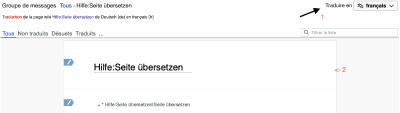
- Fig: Start translation

Once the language has been selected, you can start with the individual sections. A click on a pen (2.) in a section starts the translation of that section.
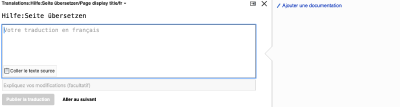
- Fig: Translate section

- Above the window is the text that needs to be translated.
- The text is translated in the window.
- To the right of the window there are sometimes help options, sometimes it is empty.
- Below the window is the button for saving.
If a section is saved, the next section of the article for translation will appear immediately. You can cancel early at any time by clicking on the cross "x".
Weblinks
- Help: Wikipedia
- Terms: Translate TrainController terms
- -- Uslex (Diskussion) 15:08, 31. Jan. 2025 (CET)
- bearbeitet: Uslex (Diskussion) 13:26, 6. Okt. 2025 (UTC)