Anlagen NotAus/en: Unterschied zwischen den Versionen
Uslex (Diskussion | Beiträge) Die Seite wurde neu angelegt: „TrainController usually goes into the frozen state when the command station is switched off or reports a short circuit.“ |
Uslex (Diskussion | Beiträge) Die Seite wurde neu angelegt: „=== Restart after emergency stop ===“ |
||
| Zeile 86: | Zeile 86: | ||
TrainController usually goes into the frozen state when the command station is switched off or reports a short circuit. | TrainController usually goes into the frozen state when the command station is switched off or reports a short circuit. | ||
< | <span id="Neustart_nach_Nothalt"></span> | ||
=== | === Restart after emergency stop === | ||
<div lang="de" dir="ltr" class="mw-content-ltr"> | <div lang="de" dir="ltr" class="mw-content-ltr"> | ||
Version vom 17. Januar 2025, 10:47 Uhr
| Verwendung |

|
Emergency stop
Operational disruptions
The question that keeps cropping up is how best to react to faults that occur during operation of a model railway system, such as short circuits in the track or impending collisions, wrong turns, etc.
In both the TC Forum (German and English parts) specific situations are described and solutions discussed.
This was also the case at the TC Stammtisch in Munich.
Unfortunately, the TrainController variants Bronze and Silver do not offer the same functions as operations as the GOLD variant.
Users of the Bronze or Silver version may be able to perform the action in the form of "a quick finger" manually via the TC menu bar(s).
Incident scenarios
In diesem Dokument wird der Versuch unternommen ein Lösungskonzept für die verschiedenen Störfall - Szenarien anzubieten.
This document attempts to offer a solution concept for the various incident scenarios.
The methods and procedures presented here do not claim to be "error-free" and are certainly "capable of improvement".
The solution concept must be "ported" to the respective user's needs.
How it works
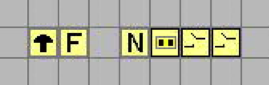
- Fig: Emergency stop system

Object functions (from left to right):
- STOP / Emergency Stop - switch: causes all trains to stop and blocks all (new) train journeys as well as those already started using block locks
- RELEASE - button: removes the train journey and block locks, sets the TC system to stop; Preparation for general release using the START button in the top TC menu
- Emergency stop sensor activation (switch): enables the suppression of the (occupancy) detector information
- Summary determination of a fault (trackman): switches on the "STOP / emergency stop switch" when a fault is detected by a detector
- Detector (e.g. track or switch): reports the re-connection of the track voltage after a fault * or the "statement" that a fault has occurred
- Detector (e.g. emergency stop button on the system): reports a fault triggered by the user
What is needed?
A function that continues to stop the train journeys, but allows individual objects on the system to be operated specifically and individually.
It should also be possible to specifically terminate individual train journeys so that they cannot start again.
Download document
The document can be accessed as a PDF under the title "TC-EmergencyStopWhat_to_do.pdf".
No changes in frozen mode
As long as TrainController is in frozen mode, it is strictly forbidden to change the state of the system. Frozen means frozen. This applies to the entire system.
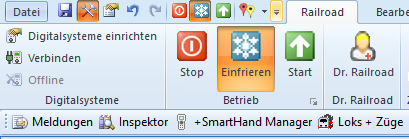
- Fig: Frozen mode

Frozen mode
As a general rule and for security reasons, the state of an object may not be changed while the session is frozen or stopped.
This means: When frozen or stopped,
- no schedules can be started,
- no blocks can be reserved,
- no routes can be activated,
- no switches can be switched,
- no buttons can be pressed,
- no macros or operations can be carried out, etc.
In particular, this also means that the system operation to start the system cannot be performed while the system is frozen.
This is a fundamental principle and cannot be changed.
If you want to change something on the system when it is frozen, TrainController must be switched to the emergency stop ("red hand").
TrainController usually goes into the frozen state when the command station is switched off or reports a short circuit.
Restart after emergency stop
In diesem Beitrag hat Herr Freiwald den richtigen Ablauf beschrieben.
Wenn TrainController in den Nothalt geschaltet wurde, so gibt es keine laufenden Zugfahrten mehr. TrainController hat damit auch keine Kontrolle über fahrende (oder in Bewegung gesetzte) Züge mehr. Die Zentrale ist (wenn möglich) so einzustellen, dass bei Wiedereinschalten der Zentrale die zuvor laufenden Züge nicht automatisch durch die Zentrale in Gang gesetzt werden. Aus diesem Zustand heraus können dann per Menübefehl alle zuvor aktiven Zugfahrten wieder neu (allerdings mit den aktuellen bzw. aktualisierten Zugpositionen) gestartet werden.
Weblinks
- Nothalt: Forum
- Anleitung: TC-NotAus-Was_tun.pdf"
- eingefrorener Modus: Forum
- TC-wiki: Nothalt bei Störung
- -- Jens Mohr 19:03, 16. Mai 2014 († 2023)
- bearbeitet: Wohlmannstetter (Diskussion) 14:59, 15. Apr. 2021 (CEST), Uslex (Diskussion) 11:30, 18. Jul. 2022 (CEST), Uslex (Diskussion) 19:19, 16. Jul. 2024 (CEST), DeepPurple 16:21, 16. Jan. 2025 (CEST)